As I anticipate I might face a wave of AI generated theses/assessments, I spent some time building a “doi checker” with some help of my silicon friends (Claude Opus - Why not co-opt the tools which brought us this mess … ). This is so I can easily check whether there are doi’s that don’t pan out in a .pdf.
Background : I think we should all encourage our students to use Doi’s when citing papers (as recommended in APA), and in my experience most AI tools will hallucinate on doi’s – this can help you identify fictitious references. These could be cases were students just copy paste from an AI tool. However, there is no golden bullet, and you should check anything flagged. In the past, I have spot checked references and found references which did not exist. I did this ad hoc, but it might be sensible to do this systematically. This tool might help me and you to systematically check doi’s.
Here is how it works: You have a folder with this script (doi_checker.r - right click and use ‘save as’) and the file(s) to check in pdf. The script will extract all doi’s, and check them via crossref. You can save the results.
Pre-requisites: You should have RStudio and R installed. You should have the following packages installed (Don’t worry RStudio will remind you, if you don’t) - you only need to do it once:
library(shiny)
library(bslib)
library(pdftools)
library(rcrossref)
library(stringr)
library(DT)
The documents to check should be in .pdf. (You can ask Turnitin to export as .pdf or do so yourself via MS word –> save as .pdf - I could also get it to work with other formats, but let’s settle on one for now.).
Checking: Make a new folder where you will place this script as well as the documents you want to check. Open RStudio and drag and drop the script onto RStudio (or use file –> open file and then open the script). Press run app (see below).
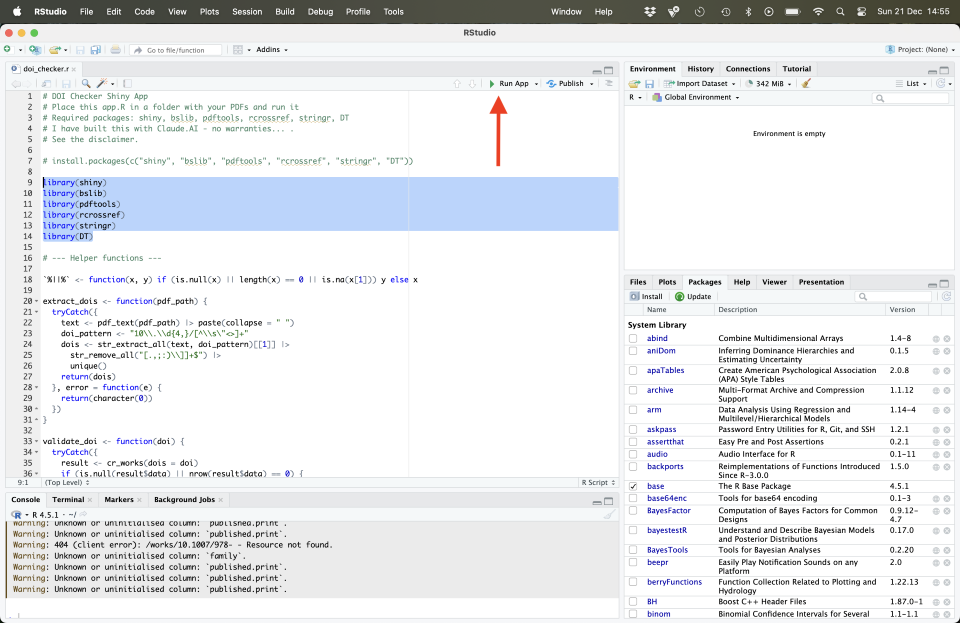
Now a window will open (see below). Scan for Pdfs will search the folder for .pdfs (1), check all doi’s will check all doi’s in said pdfs (2), Pdfs found (3) will report on pdfs found, Doi results (4) will give you the result for each doi found, summary will provide a brief summary. Using export you can save the results in .csv.
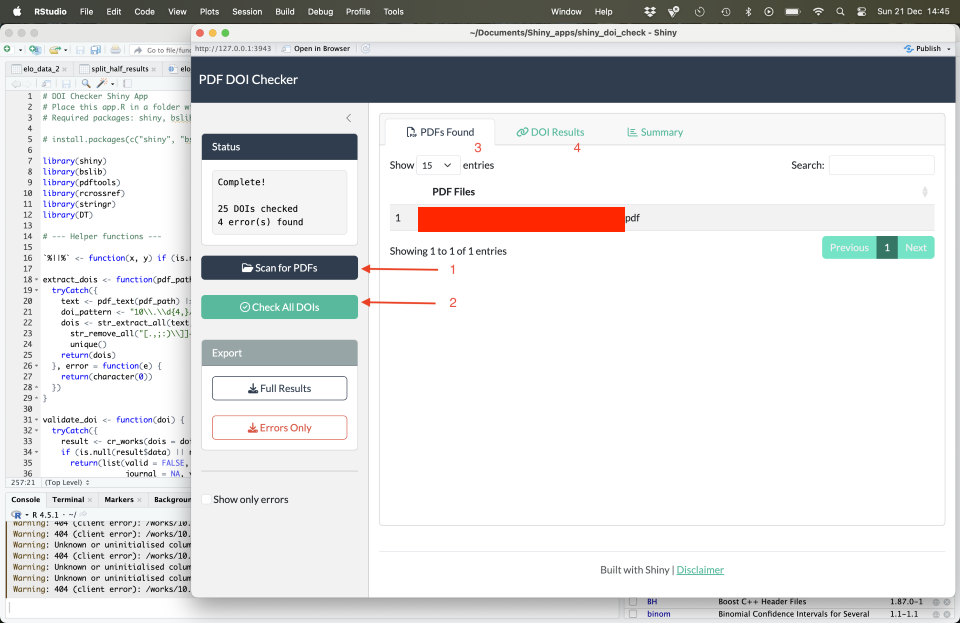
I recommend running only a couple of .pdfs at a time (Would not recommend running dozens of pdfs in one go - though it likely will work… .). I recommend exporting your results and removing the ones you checked from the folder and to batch your work if there are large amounts you intend to check.
Known issues / limitations:
-
I have checked only a handful of .pdfs (incl. published papers and Turnitin .pdfs downloaded from Blackboard). I have also checked a MS word doc converted to .pdf. It works fine but I have not tested all flavours of fonts, etc. It runs smoothly but you might have to wait a while if there are many refs (and/or longer .pdfs)
-
This relies on crossref (www.crossref.org / check status if it is down) which captures meta-data. Though widely used, there are some doi’s that are not indexed in crossref. If you intend to run truly massive volumes of ref checks you should get in touch with me and I’ll look into tweaking this so you can rely on their API.
-
I have resolved some issues with line breaks but if a doi runs over multiple lines, it is possible that it only gets read partially. This is due to how long lines get read in. (It’s long story but PDFs are pretty awful for extracting texts and we rely on regex to uncover patterns). Thus some doi’s might get flagged by accident but it is just that the doi was read incorrectly - currently no fix - but these will be comparatively rare I suspect… . You’ll be able to quickly spot the issue.
-
I have checked docs with approx. 50-60 references - akin to a student thesis. If you check many docs with many references you might face issues. I recommend checking only a couple at the time. I have built in a delay but if you try to check many refs, you might be timed out - as it calls on crossref.
Recommendation: This is only tool, it will highlight some suspect doi’s which you would then want to further check. You might not want to use it for every single assessment/thesis you encounter. Then again, it is easy to do. This won’t definitively tell you whether anything untoward has happened, but if you find multiple references that do not seem to exist (or are incorrectly referenced) this could be something for you to look into. (Note also as above, that there might be some false positives, for example, a broken up hyperlink or a reference not in crossref).
Caveat emptor: It comes with no warranty - as it is just something I pulled together. I built this to solve my problem of having to repetitively check doi’s. Likely somebody else has built something better and more useful but this runs local and apart from querying the doi’s no data leaves your machine… . If you run into issues, drop me a line and I’ll see what I can do to help - I am not rebuilding it for other purposes though and am not volunteering as Shiny tech support… :).